You can configure and deploy True Cache with the Database Configuration Assistant. Even when using the Database Configuration Assistant to set up, there are items that need to be completed prior to configuring True Cache. One thing you need to make sure that your network path access to the primary database has set up with an Easy Connect string from the True Cache node.
You’ll need to install the software on all the Two Cache, and you want to make sure that your primary database is running in archive log mode. It’s needed to ship the redo log files to the True Cache node for that. Of course, if your primary database is not running an archive log mode that you want to use for True Crash, you will have to change that. And do not set these two parameters on your primary database. That’s because True Cache is going to automatically configure these for the primary database for its use.
If you’re using a password file, you can copy the password file from the primary database. Or, if you’re using transparent data encryption, you can copy the wallet. You can either do this manually or you can also create a blob with the Database Configuration Assistant. So here, you can see the command to create the blob on the primary database.

So you’re going to prepare the True Crash config file. That is the option that says, hey, I’m going to create that blob that’s going to have that password file or the wallet.
You’re going to identify what is the primary database system ID, and then the location, the path where you’re going to save the blob on that primary database. You want to make sure that the file that you copied to the True Cache and ensure that the file is owned by the Oracle home user. So then when you configure True Cash, if you’ve manually copied the password file, you want to identify what is the True cash unique name, the database unique name, or in this case, we use the global database name. Either one of those will work.

What is the system identifier for the True Cache? And here is that connection string to the source, to the primary database using that Easy Connect. The password file, that’s the path to the primary database password file that was copied. You’re going to copy to the True Cache node. If you’re using a blob, then basically the same, very identical, except now we have the True Cache blob from source.

This is the full path and file name for the configuration for the blob file that contains that password file or the wallet. This is the path where that file is located.
You can use the JDBC thin driver for each primary database application service that you want to cache or create a corresponding True Cache database application service for. It’s going to make it easy for the applications to switch an existing JDBC connection from a primary database to a True Cache instance without having to change the JDBC URL. You want to make sure that you have a listener configured. You can check to see if Valid Node Checking for Registration, the VNCR, is configured for the listener. If so, then you’re going to want to make sure that you add True Cash to the REGISTRATION_INVITED_NODES_LISTENER parameter, and that’s in the listener ORA file.
If you’re using a RAC environment, you want to make sure that you use service control to add it.

Do not manually edit the listener ORA file as the grid owner. Best to use service control. You’re going to create and start your primary database service. Here, we’re creating a service called Sales.

We’re starting on the primary database. If you’re using RAC, you’re using service control utility to do that.

You can verify this service with a very simple SELECT. Here, we’re selecting from active services, and we can see there’s our sales service that’s running on the primary database.

You can run the silent mode, the DBCA configuration command. In this case here, we’re going to what? We’re going to configure a database. So here, we’re going to use this option to configure the database application service on the primary and start the service on the True Cache.
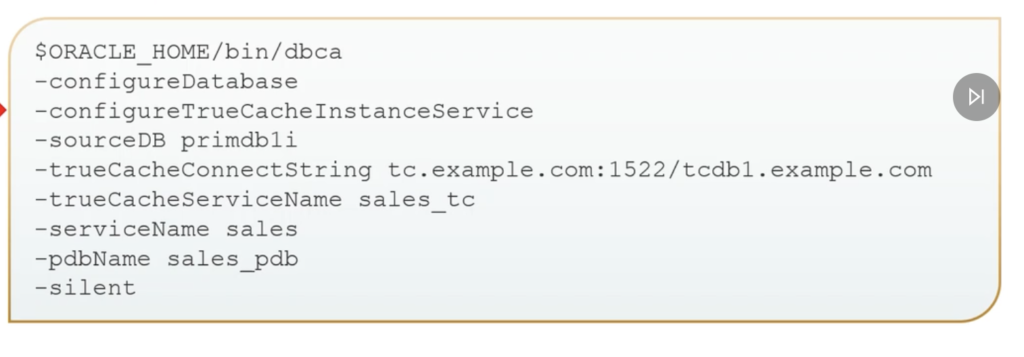
Where is my primary database? What’s the unique name of that? Here’s my connection string in. We’re going to have that Easy Connect connection string for that. What is the True Cash service name?
Remember, I have mentioned about want to have whatever your primary database service name. Most likely, make sure that we have True Cash, tc on that so that way we can identify it as True Cash very simply. What is my primary database service name? So there we can see the sales and it relates to the sales through cash, and the primary pluggable database name for the True Cash. And then, of course, we run it in silent mode. After the application service starts on the True Cache, we want to make sure we can use the listener control command to validate the remote listeners.
So here, we can see we have our two True Cash registered with the SCAN listener. We’re using the SCAN listener.
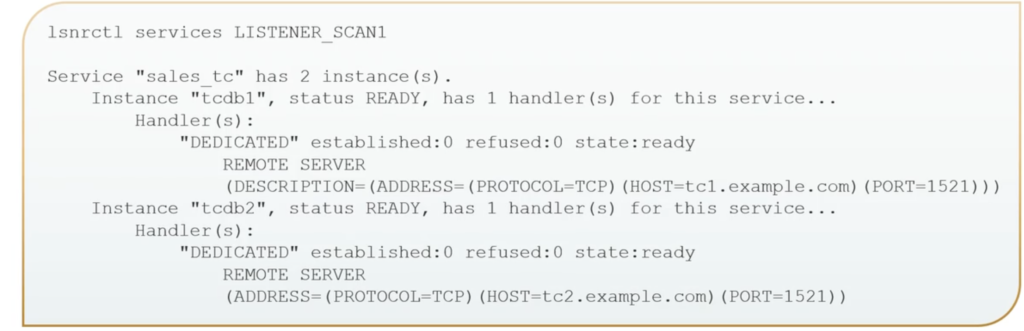
So this would be a RAC primary database, and we can see we have the True Cache instances available there. For the uniform True Cash configuration with multiple True Cash service in the same service, we want to start. We’re going to start the service on all, all the True Cash instances.


Recent Comments