Before we can configure, we’re going to have to install the database software on all the true cache nodes. We want to make sure, again, just like previously– even with the automatic DBCA, we want to make sure that the primary is an archive log mode.
And you want to make sure that you set archive log mode on that primary database. Do not set on the primary database that log archive config or the log archive destination on the primary database. That’s because true cache, again, is going to configure these for the primary database, just like it did if we were using the automatic– using the DBCA. Very similar there.
You want to make sure you check the prerequisites. You want to make sure that you have a tnsnames file created with– on both the true cache and the primary database nodes with the correct information for both, so not only true cache instance information but also for the primary database. You need to have a listener. Local listeners use for that redo to be received from the primary database. It must exist and must be started.
We previously saw about the password file. There are several different parameters required to start a true cache instance, so you’re going to have to create a p file. Then you’re going to create and start the true cache. We’re going to start up no mount. Verify the password file if you’re using it. Verify the status of the true cache instances. You’re going to create the application services on your primary database.
You’re going to make sure the services are created if you don’t already have them created for that. Verify the application services are created on both the primary and the true cache, and make sure that they are both available. You do need to create or modify your tnsnames file. Again, you can do that manually, or you can use the NETCA– the Network Configuration Assistant. So you can use either one to do that.
You’re going to add the application service names for the network names that we use for all the database instance participating in the true cache configuration. You’re going to add the database instances. In the tnsnames, you have to have– there’s basically three for True Cache and three for the primary. One is True Cache. You’re going to have the network name plus the application services.
The primary database needs to have the instance network name and also the application service name. And then what about the listener for that primary database and also for your True Cache instances. So here’s a little sample entry.
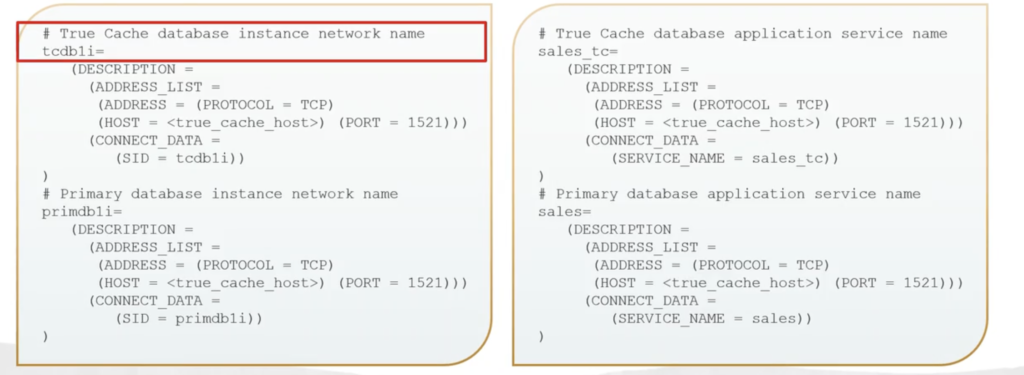
So you can see we have our TCDB1I, so our True Cache instance there identifying the protocol. What is the protocol? What is the host name? What is the host name? What is the port number, and what’s the system ID for that? We also have one for our primary database.
Then we can see there’s for our True Cache service, the sales tc, and then also an entry. There’s an entry for that primary database application service name, sales. So for our tnsnames, there’s a sample entry for our listener, for the primary and also for our True Cache instance.
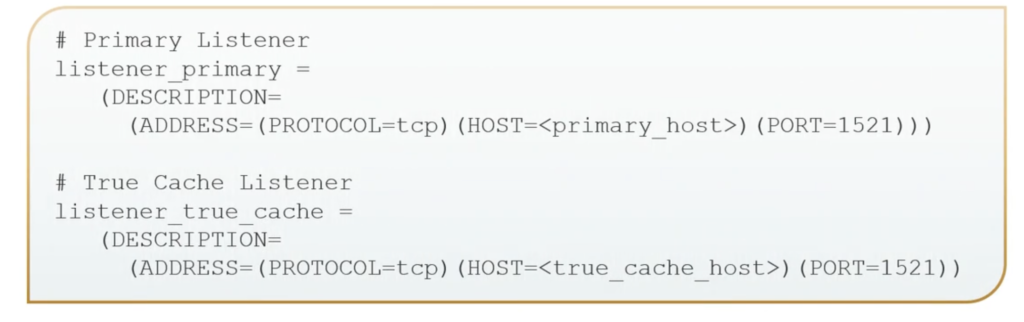
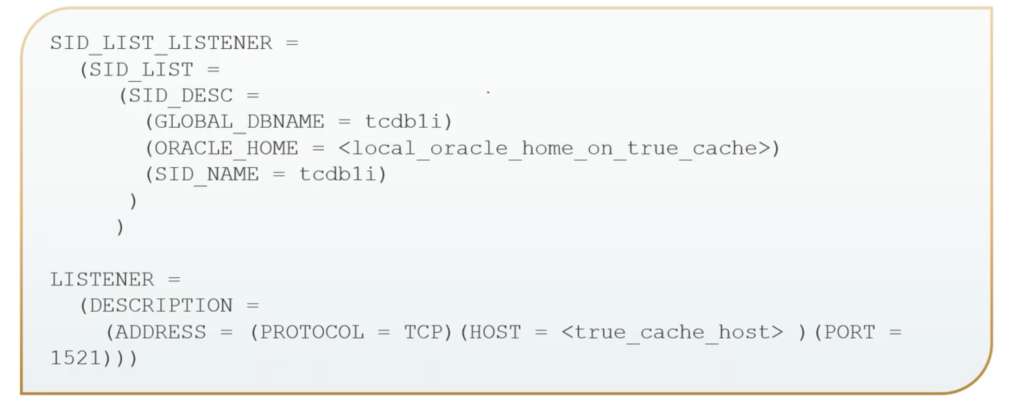
That listener.ora file is required, again, either manually or with the NETCA. Not only do we have to have the tnsnames, but we have to have the listener.ora file.
You want to make sure your environment variables are set, that the Oracle home and Oracle cid are set properly. You can just do an env in Linux C environment. Rep one just for Oracle– however you want to do that. We want to make sure that home bin path directory is in our environment. You can just do an echo dollar path on that and see what paths are set for that.
You’re going to want to make sure that the listener is running, if it’s not already, so here, just very simply. We’re going to start the listener, and we’re going to check the status. Or if you’re pretty sure it started, just go ahead and check the status. And if it’s not, then start it and check the status again– however you want to handle that.
For the password file, it does require to have that up to date password file. Previously, we looked at how we could copy that manually. All right? Or we can create the blob– use the DBCA for that. But it’s from that primary database. It’s needed in order to be able to apply that redo to the True Cache. If you update the password file, you do want to make sure that you recopy it– whenever administrative privileges, like the SYS DG, OPR, DBA is granted or revoked, you want to make sure you recopy it.
If you’re using a wallet, copy the wallet inside the password file if you’re using the Transparent Layer Security, instead of a password file. If the primary database configures transparent data encryption, you need to make sure you copy it. So there’s the TLS certificate authentication if you’re using TDE. And you want to make sure that you only include the root container master key in the copy, and those are needed to decrypt the encrypted redo that shipped from the primary to the true cache to keep it consistent.
You do need to prepare a PFILE for startup. So you’re going to– what is the True Cache? What’s the instance? What’s the name going to be? My primary database instance. What’s going to be your unique name for my True Cache? And my DB files the same as my primary database instance. How much memory are you going to allocate to the SJ for that? Where is my parameter for the primary database node listening then?
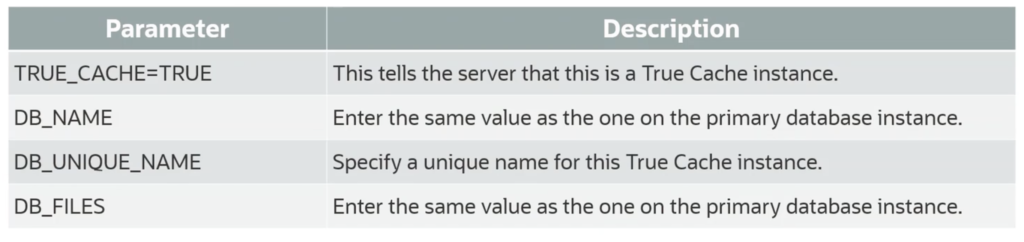
And that FAL server– when I first saw that, I thought that’s a failover server or what? That’s just a fetch archive log. That’s the name for the primary database for that, so that way I can know where to connect to and then also the client network name for that. So fetch the archive log FAL.
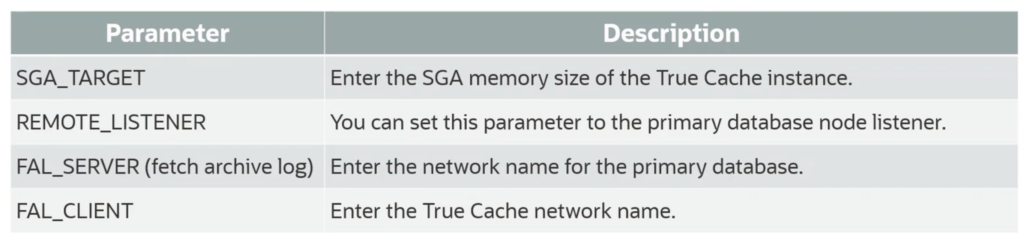
The DB create file destination to store the required internal True Cache instance files. Again, control file, temp files– where is that going to be at? I might need to set up my DB domain for where the node resides at and then also for my wallet route and the TDE configuration.
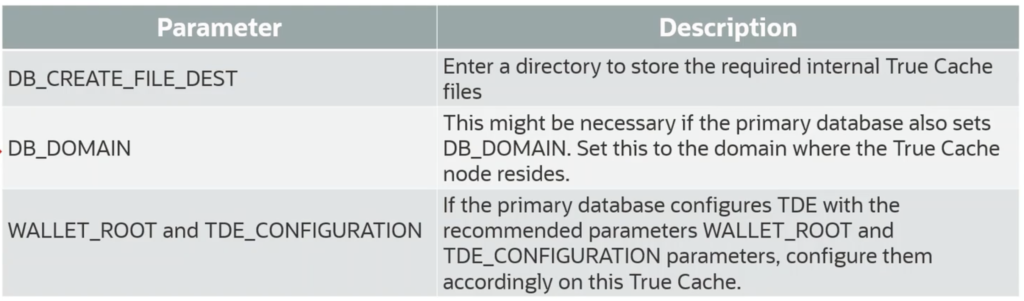
So here is a very simple example for the PFILE. OK. This instance is going to be True Cache. Same value as the one for my primary database– where is that? What is the unique name for this True Cache going to be? The number of database files– you want the same as the primary database. How much SGA am I going to give it?
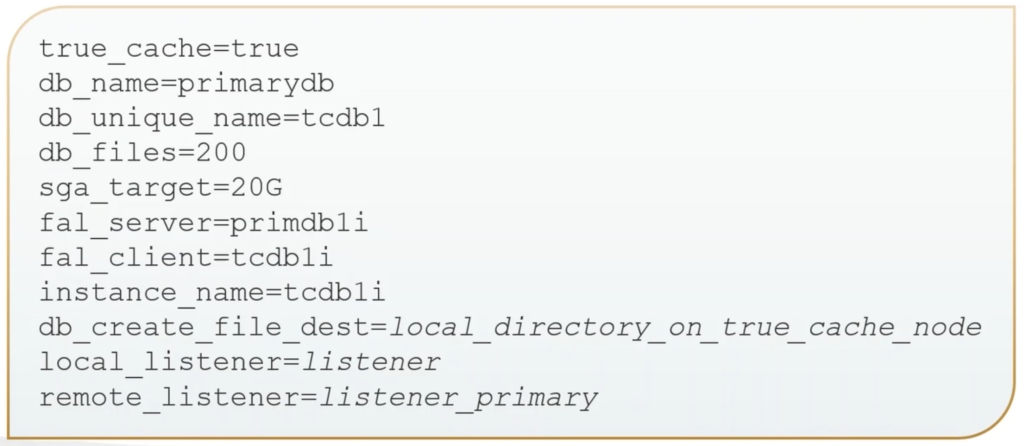
There’s the fella FAL server. What’s the network name for my primary database? And the client is the True Cache network name. There’s my instance name for this True Cache. The directory where I’m going to store the internal files for the True Cache. Specify my network name that’s going to resolve that local listener. And what is the primary database listener– not needed to create the True Cache, but this one is needed if you’re going to use a JDBC.
So we’re going to start up our True Cache using that PFILE in NOMOUNT.

We’re going to verify the password file. We’re going to create that True Cache, and it automatically creates those standby redo logs, the control files, temp files, SPFILE because then on the next shutdown start up, it’ll use the SPFILE.

We have to create that PFILE– one for it to start with. And then after that, our True Cache is ready to use.


Recent Comments