Managing a Kubernetes cluster shouldn’t mean managing servers. Oracle Kubernetes Engine (OKE) offers virtual nodes — a fully managed, serverless experience that lets teams focus entirely on their applications. Here’s what they are, how they work, and when you should use them.
The problem with traditional node management
Imagine you’re the team lead for a pharmacy application running on an OKE cluster. Things are mostly smooth — but every time the team needs to scale up, someone has to manually provision nodes, pick the right shapes, upgrade Kubernetes, and make sure capacity stays in sync with demand. That kind of operational overhead adds up fast, and it requires specialized knowledge your team may not always have on hand.
That’s the exact scenario virtual nodes were built to solve.
Understanding managed nodes first
Before diving into virtual nodes, it helps to understand what they’re replacing. Managed nodes run on compute instances within your own OCI tenancy. They look and behave like regular servers — because they essentially are.
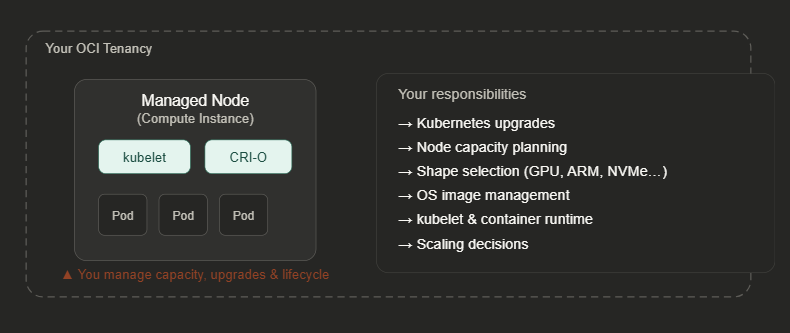
The kubelet acts as the “brain” of a managed node — it tracks pod lifecycle states, communicates with the Kubernetes control plane, and works alongside a container runtime such as CRI-O or containerd to run your workloads. You also get full flexibility around specialized hardware: GPUs, local NVMe drives, RDMA networking, ARM or x86 architectures. When workloads have highly specific hardware requirements, managed nodes are the right choice.
But when they don’t? You’re carrying a lot of unnecessary overhead.
Enter virtual nodes
Virtual nodes flip the model entirely. Built on the open-source Virtual Kubelet project from the CNCF, they appear to Kubernetes exactly like real nodes — but there’s no physical server for you to worry about. OCI handles everything underneath.
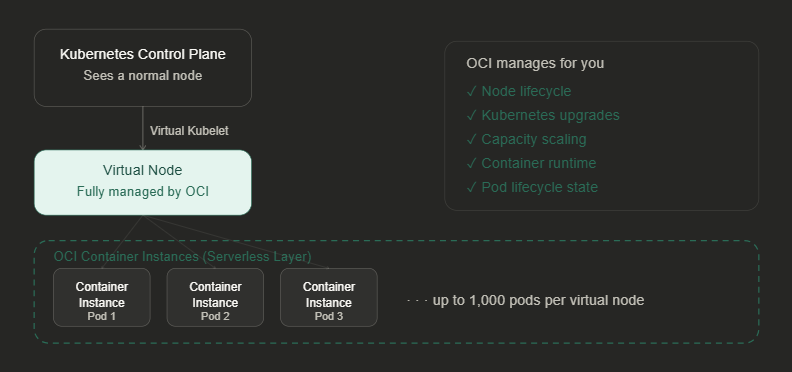
The key technical distinction is how the pod lifecycle is managed. On a managed node, the kubelet tracks pod state. On a virtual node, that responsibility shifts to Virtual Kubelet, which translates Kubernetes pod specs into OCI Container Instances behind the scenes. You never touch the underlying compute.
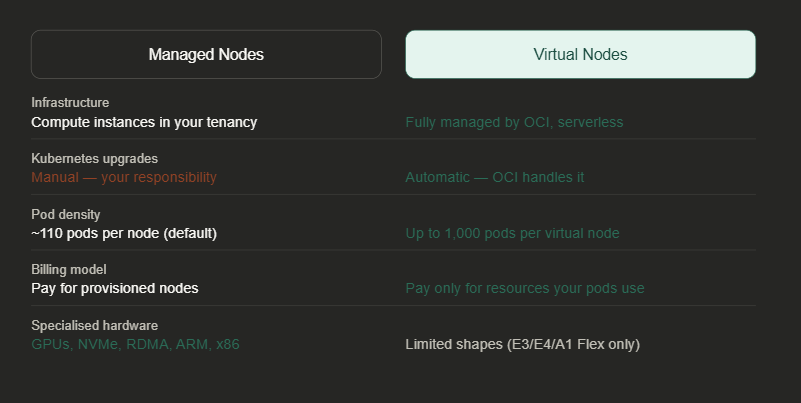
Managed nodes vs virtual nodes: a direct comparison
Supported shapes for virtual nodes
Virtual nodes support a specific, focused set of shapes. Unlike managed nodes — which support bare metal, GPU, dense I/O, and HPC shapes — virtual nodes currently offer three flexible pod shapes:
| Shape | Architecture | Best for |
|---|---|---|
| Pod.Standard.E3.Flex | x86 (AMD) | General-purpose workloads |
| Pod.Standard.E4.Flex | x86 (AMD) | Latest gen general compute |
| Pod.Standard.A1.Flex | ARM (Ampere) | Cost-optimised workloads |
To check which shapes are available in your tenancy, run:
oci ce node-pool-options get --node-pool-options-id allLook for the data.shapes section in the response. If your workloads require GPUs, RDMA networking, bare-metal servers, or local NVMe drives, stick with managed nodes for those workloads.
When should you use virtual nodes?
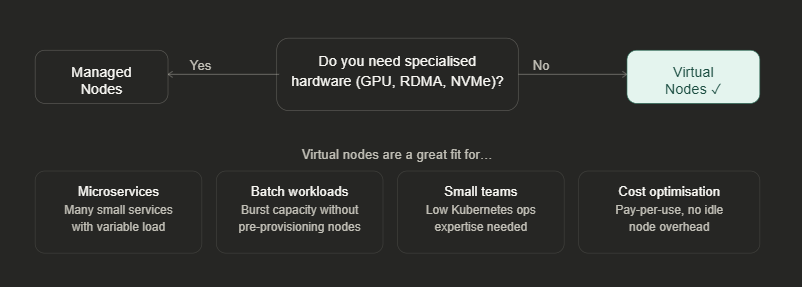
Virtual nodes on OKE aren’t a replacement for managed nodes in every scenario — they’re a fundamentally different model suited to different problems. The big wins are operational simplicity (no nodes to patch or upgrade), elastic cost efficiency (you pay for what your pods actually consume), and extreme pod density (up to 1,000 pods per virtual node — more than 10× a typical managed node).
For teams like the one in our opening scenario — running a pharmacy application with limited infrastructure expertise — virtual nodes can dramatically reduce the operational surface area without sacrificing any of the Kubernetes primitives they rely on. Kubernetes stays exactly the same from the developer’s perspective. The heavy lifting is now handled by Oracle.
OCI is currently the only major cloud provider offering a production-grade, fully managed Virtual Kubelet product. If you’re already on OCI OKE and your workloads don’t require specialized hardware, virtual nodes are worth evaluating seriously.


Recent Comments