To deploy True Cache for an Oracle RAC primary database, there are some additional configuration, things you have to do. If you’re using the Database Configuration Assistant, you want to make sure that you set for the scan port service for that.
For the manual configuration, you’re going to set the REMOTE_LISTENER parameter to the SCAN:port. You’re also going to configure that FAL_SERVER parameter to the SCAN:port/service_name. You’re going to add True Cache to the– True Cash node to the SCAN listener. You’re going to use the Service Control command. You’re not going to manually edit. Do not manually edit it. You use Service Control command to add that. When creating the database application service on the primary database, you can use the Service Control command line utility. And then you’ll start the service on the primary instance.
You can verify is the True Cache instance actually applying the redo and making progress a couple different ways. First, we want to verify that our True Cache instances are OPEN, READ ONLY WITH APPLY. This means that the true Cache Instance we do apply is actively working or should be actively working.
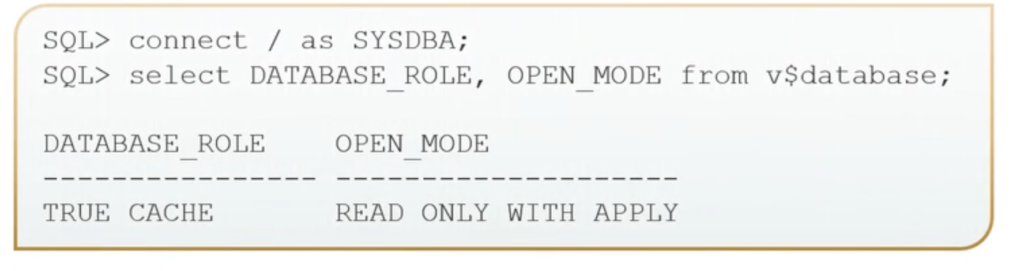
Then you might check the SCN. And you might check it occasionally to see if it is advancing to letting you know that it is applying changes.
We want to make sure we want to validate our remote listener. So we’ve seen these before where we have our service names. And there’s our True Cache instances. So here, we see we have True Cache registered with the SCAN listener for a RAC primary database.
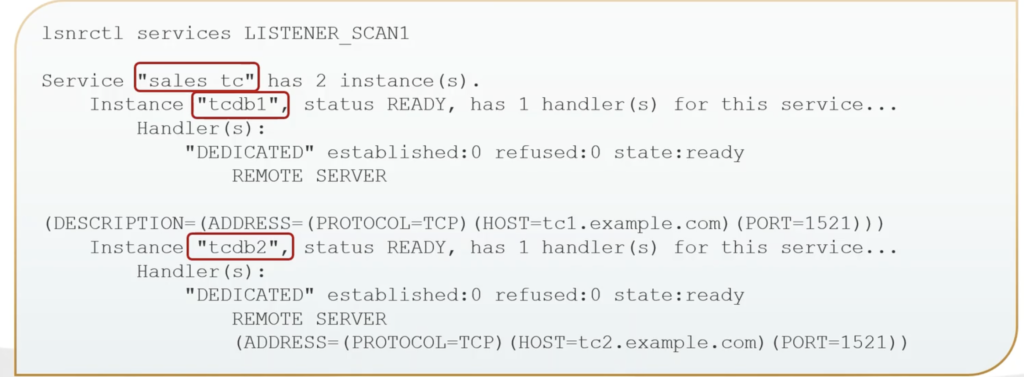
You can verify the application service on True Cache. Go to connect to True Cache instance and go ahead and select from the Active Services view.

And then we can also do the same thing on our primary database.
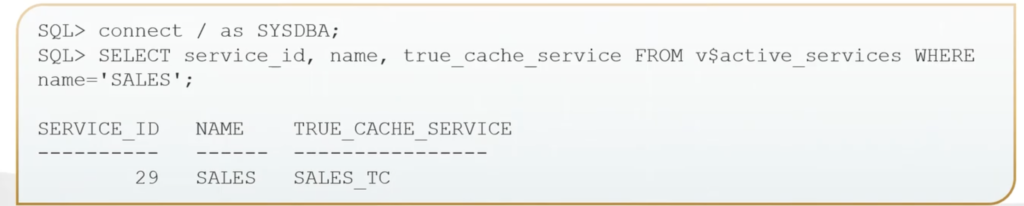
We’re going to go ahead and connect.
And select from that v$active_services. In this case here, we’re just looking for our sales. And here, we can see there is our sales from our primary database and then the SALES_TC from our True Cache instance.


Recent Comments